
Which SSH client for Mac is right for you?
Every app here is good at something. Start from the job you do most, and the list gets short fast.
- Many servers, keys in one encrypted vault, every protocol free: Wardterm.
- One client on Mac, Windows, Linux, iOS and Android: Termius.
- One polished app on every Apple device: Prompt 3.
- Server files in the Finder: Secure ShellFish.
- tmux sessions you browse from a menu: La Terminal.
- Remote desktop next to SSH: Royal TSX.
- Scripts against hundreds of network devices: SecureCRT or ZOC.
- You type
sshyourself and want a great terminal: iTerm2 or Ghostty.
The 10 best SSH clients for Mac
1. Wardterm
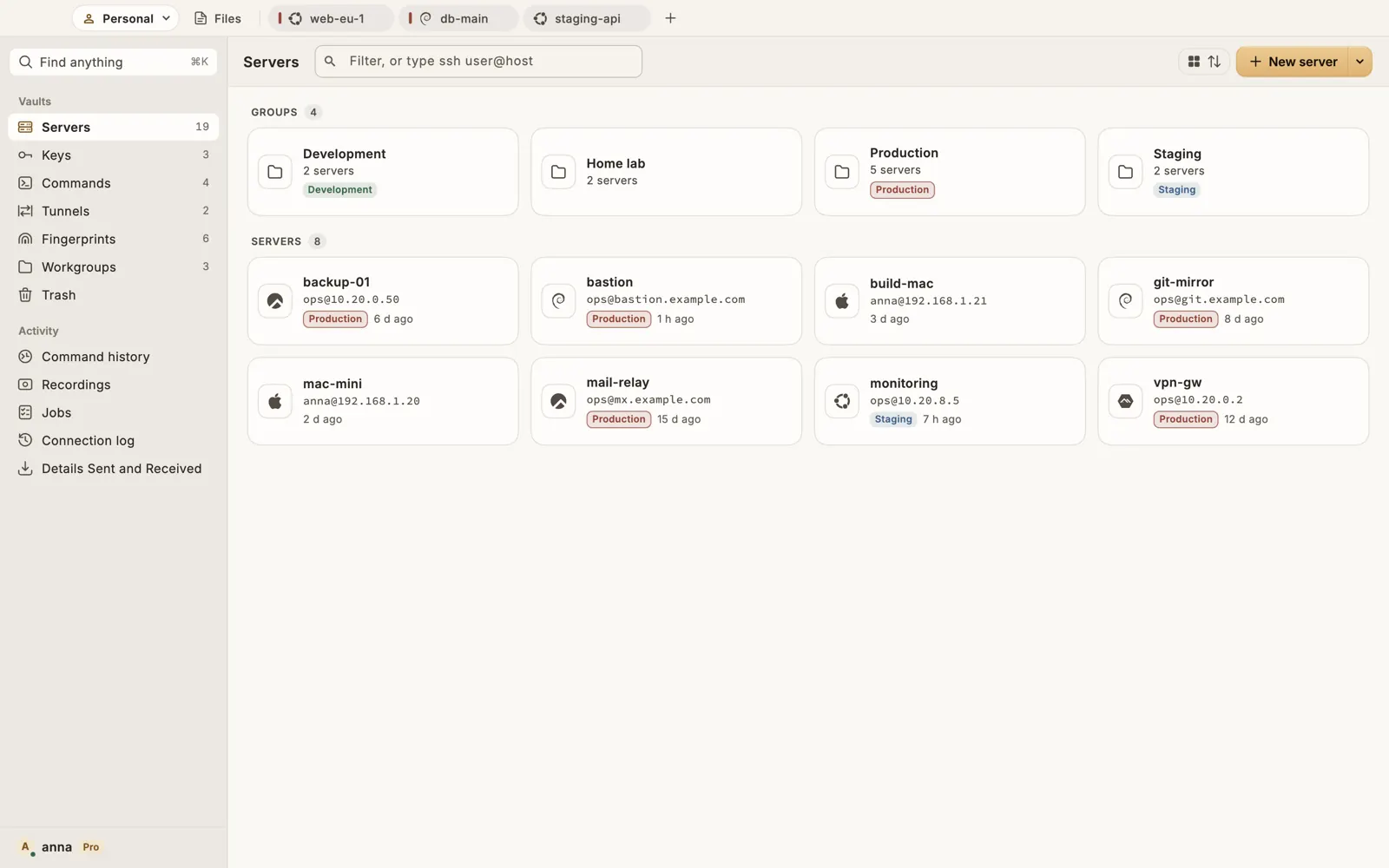
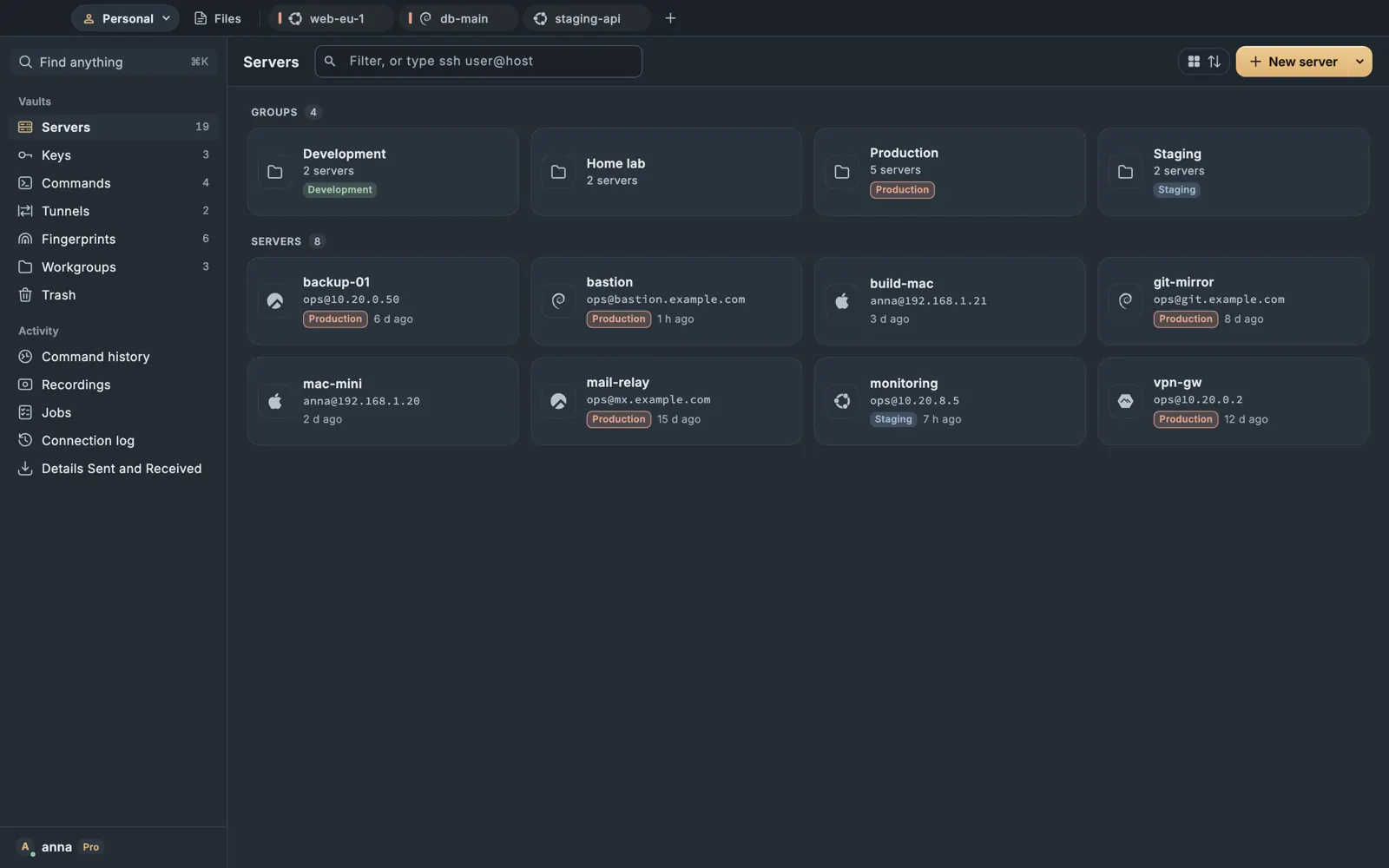
Wardterm is a native SSH client for Mac for people who work on many servers. Servers, keys and passwords live in one encrypted vault, and the same vault opens on iPhone and iPad.
What it does well
- Every protocol in the free plan. SSH, Mosh, Telnet, serial consoles and a local terminal, with tunnels, jump hosts and proxies.
- SFTP side by side. Local files and a server, or two servers, with drag to and from the Finder. A remote file opens in its usual Mac app.
- Built for many sessions. Up to 16 panes per tab, Cmd+K to find any server or action, and a command run on several servers with the exit code and output of each.
- Keys your other apps can use. Terminal and git sign in with keys from the vault, each use approved with Touch ID. Keys can live in the Mac's secure chip, or on a YubiKey.
- AI agents in one place. With Pro, the Agents tab follows Claude Code, Codex and Gemini CLI in your sessions, and session alerts tell you when one waits.
- A question before risky commands on servers you mark as production. Production safety.
- Good for
- Developers, sysadmins and small teams who want servers and keys in one encrypted place on every device.
- Cost
- Free plan. Pro is paid, with a 14-day free trial. Plans.
- Platforms
- Mac (macOS 12 or later), iPhone and iPad.
2. Termius
Termius is an SSH client with apps for five systems and a cloud vault between them. Its home page says it is trusted by more than 2,000,000 engineers.
What it does well
- One vault on macOS, Windows, Linux, iOS and Android, end to end encrypted.
- SSH, SFTP, Mosh, port forwarding and IDE-style autocomplete.
- SSH ID for FIDO2 and biometric keys, and multiplayer sessions for teams.
- SAML single sign-on and a SOC 2 Type II report on its larger plans.
- Good for
- People who switch between many systems, and companies that need single sign-on.
- Cost
- Free Starter plan, commercial use allowed. Paid plans for individuals and teams.
- Platforms
- macOS, Windows, Linux, iOS, Android.
3. Prompt 3
Prompt 3 is Panic's SSH client, from a maker known for its Mac software.
What it does well
- SSH, Mosh and Eternal Terminal, with jump hosts and an optional GPU text engine.
- Panic Sync for servers, keys, passwords and Clips.
- Favorites protected by Face ID or Touch ID, and YubiKey support.
- Good for
- Apple users who want one app on every Apple device.
- Cost
- Yearly plan or one-time purchase, after a 7-day free trial.
- Platforms
- Mac, iPhone, iPad, Apple Vision.
4. Secure ShellFish
Secure ShellFish by Anders Borum puts your server folders in the Finder and the Files app, with a terminal beside them.
What it does well
- Server folders in the Finder, and file names in the output you can drag and share.
- tmux sessions with thumbnails and Handoff between devices.
- SSH certificates, Secure Enclave keys and security keys.
- Suggest Command with Apple's Private Cloud Compute, and frequent updates.
- Good for
- People who edit server files from the Finder and keep work in tmux.
- Cost
- Free with ads, with monthly, yearly or lifetime Pro.
- Platforms
- Mac, iPhone, iPad, Apple Vision, Apple Watch.
5. La Terminal
La Terminal by Xibbon is an SSH and Mosh client for Apple devices, built around tmux.
What it does well
- tmux control mode: browse, switch and rename sessions and windows.
- Keys in the Secure Enclave, and settings and keys synced with iCloud.
- An SFTP file manager in Pro, resource monitoring and a command assistant.
- Good for
- tmux users with an Apple silicon Mac and an iPhone or iPad.
- Cost
- Free, with a paid Pro plan, monthly, yearly or lifetime.
- Platforms
- Mac with Apple silicon, iPhone, iPad, Apple Vision.
6. Royal TSX
Royal TSX is the Mac version of Royal Apps' connection manager: RDP, VNC, SSH, Telnet, web pages and file transfer in one document.
What it does well
- Documents that open on Windows, Mac, iOS and Android, shared through a network share or cloud storage.
- Credentials reused and inherited by folder, with LastPass and KeePass integration.
- A license with no subscription, and a free Lite edition for up to 10 connections.
- Good for
- IT teams with mixed Windows and Linux fleets.
- Cost
- Free Lite edition, or a one-time license.
- Platforms
- Mac, Windows, iOS, Android.
7. SecureCRT
SecureCRT 9.7 by VanDyke Software is a long-standing commercial terminal for SSH, Telnet and serial work.
What it does well
- Scripting in Python 3, VBScript, JScript and PerlScript, with a script recorder.
- X.509 smart cards (PIV and CAC) and FIPS 140-2 approved ciphers.
- Emulations such as VT100, TN3270, Wyse and SCO ANSI.
- Good for
- Network engineers who automate many devices and need compliance features.
- Cost
- Paid license, with a 30-day evaluation.
- Platforms
- Windows, Mac, Linux, iOS.
8. ZOC Terminal
ZOC Terminal by EmTec covers a wide range of protocols and emulations, mainframes included.
What it does well
- SSH based on OpenSSH, SFTP, Telnet with TLS, serial over USB adapters, TN3270 and TN5250.
- FIDO2 keys such as YubiKey, PKCS#11 smart cards and OpenSSH certificates.
- REXX scripting and AppleScript.
- Good for
- Network, device and mainframe work on Mac and Windows.
- Cost
- Paid license, after a free trial.
- Platforms
- Mac, Windows.
9. iTerm2
iTerm2 is a free, open source terminal for macOS that runs the system ssh. Version 3.7 came out on 8 September 2026.
What it does well
- tmux integration with
tmux -CC: tmux windows become native tabs. - Triggers, shell integration, profiles per host and a Python API.
- AI Chat with your provider, with Never, Ask or Always for each permission.
- New in 3.7: a Claude Code integration, an iPhone companion app and tab groups.
- Good for
- People who live in the
sshcommand and tmux. - Cost
- Free, open source.
- Platforms
- macOS.
10. Ghostty
Ghostty is a free, open source terminal with a native interface and GPU acceleration. Version 1.4.0 came out on 27 October 2026.
What it does well
- Fast and ready with no configuration.
- A native Mac interface, with the same terminal on Linux.
- Good for
- A fast local terminal for people who type
sshthemselves. - Cost
- Free, open source.
- Platforms
- macOS, Linux.
Also worth a look. Tabby, Electerm and WindTerm are free clients for Mac, Windows and Linux, and XPipe gathers SSH, containers and VMs in one window. More in our Termius alternatives.
What does the built-in SSH client on a Mac already do?
A lot. macOS ships OpenSSH, so ssh, scp and sftp work in Terminal out of the box. Five lines in ~/.ssh/config make it much nicer:
Host *
  AddKeysToAgent yes
  UseKeychain yes
  IdentityFile ~/.ssh/id_ed25519
  ServerAliveInterval 30
Then store the passphrase once in the macOS Keychain:
ssh-add --apple-use-keychain ~/.ssh/id_ed25519Now you type the passphrase once, and quiet connections stop dropping. Our guides to ssh-agent and the Keychain and to the SSH config file go further.
Where the built-in client stops is the rest of the day: a list of fifty servers, files moved with a window, tunnels you start with a click, the same servers on your phone. That is what a dedicated client adds. Most of them, Wardterm included, import that same config file, so the work you put in carries over.
Which SSH client for Mac has SFTP, Mosh and serial?
Wardterm has all three in its free plan, with its own Mosh client and serial consoles with every line setting. SecureCRT and ZOC are strong on SFTP and serial, with emulations for older systems. Termius, Prompt 3 and La Terminal include Mosh, and Secure ShellFish puts files right in the Finder.
iTerm2 and Ghostty work differently: their SSH is OpenSSH. Files go with scp, sftp or rsync, and Mosh comes from brew install mosh. A clean setup if you like the command line.
Is there a free SSH client for Mac?
Yes, and the free options fall into three groups.
- Free terminals: iTerm2 and Ghostty, which run the
sshthat comes with macOS. - Free plans of full clients: Wardterm Free, Termius Starter and Royal TSX Lite. Secure ShellFish and La Terminal have free versions too.
- Free trials: Prompt 3, SecureCRT and ZOC are paid apps you can try first.
Wardterm Free has every protocol, unlimited servers, tunnels, the encrypted vault and production warnings. Pro adds sync, Agents, session alerts, on-device AI and hosting a shared session. See all plans.
Which SSH connection manager for Mac fits your work?
- You work on dozens of servers every day. Wardterm: groups, tags, Cmd+K, workgroups that reopen as you left them, and a command on several servers reviewed first.
- You run AI coding agents on servers. Wardterm with Pro shows every agent in one tab, and Keep This Session keeps them running when Wi-Fi drops.
- You need single sign-on for a company. Termius offers it on its larger plans.
- You script against many devices. SecureCRT's Python and ZOC's REXX are built for that.
- You prefer one payment. Prompt 3, Secure ShellFish and La Terminal have one-time options, and Royal TSX has no subscription.
- You live in tmux. iTerm2's
tmux -CCor La Terminal's control mode. - You manage remote desktops too. Royal TSX keeps RDP, VNC and SSH together.
Can a Mac SSH client sync with your iPhone?
Yes. With Wardterm Pro, the same end-to-end encrypted vault, with servers, keys, passwords and saved commands, opens on every device. The iPhone app has its own interface: a key bar you arrange, Mosh, and open sessions on the Lock Screen. Our best SSH apps for iPhone and iPad looks at the phone side.
Others sync their own way: Termius across five systems, Prompt 3 with Panic Sync, Secure ShellFish and La Terminal with iCloud, and Royal TS with shared documents.
How do you choose an SSH client for Mac?
- List your protocols. If you need Mosh, Telnet or serial next to SSH, pick a client that has them all.
- Count your devices. If you also work from a phone or iPad, pick a client that syncs to it.
- Decide where your keys may go. Read how each client stores and syncs them, and whether it can keep a key in the secure chip.
- Try it on a real week. Import your
~/.ssh/config, connect to your usual servers and do your normal work.
Using Mosh on the train? See the best Mosh clients. For file transfer apps only, read the best SFTP clients for Mac.
Questions
What is the best SSH client for Mac?
It depends on your work. Wardterm keeps servers and keys in an encrypted vault and has SSH, SFTP, Mosh, Telnet and serial in its free plan. Termius runs on five systems, Prompt 3 covers Apple devices, SecureCRT suits network engineers, and iTerm2 suits people who use the ssh command.
What is the best free SSH client for Mac?
There are several. Wardterm Free covers SSH, SFTP, Mosh, Telnet, serial and tunnels. iTerm2 and Ghostty are free open source terminals that run the system ssh, and Termius and Royal TSX have free plans too.
Does macOS have a built-in SSH client?
Yes. macOS ships OpenSSH, so ssh user@host works in Terminal. A dedicated client adds a server list, stored keys and passwords, file transfer in a window, saved tunnels and sync. See our guide to SSH on a Mac.
What is the best SFTP client for Mac?
Wardterm has two-pane SFTP with drag and drop to the Finder on every plan, and opens a remote file in its usual app. Termius, Royal TSX, SecureCRT and ZOC list SFTP too, and Secure ShellFish shows server folders in the Finder.
Can I use Mosh on a Mac?
Yes. Wardterm has its own Mosh client with predictive echo, free. Termius, Prompt 3 and La Terminal list Mosh as well, and brew install mosh gives you the command line client. The server needs mosh-server and open UDP ports.
Which Mac SSH client supports serial consoles?
Wardterm has serial consoles in the free plan, with every line setting. SecureCRT and ZOC list serial support too. More on the serial terminal page.
Is there PuTTY for Mac?
PuTTY's maker publishes it for Windows and Unix. On a Mac, Wardterm, SecureCRT and ZOC all do SSH, Telnet and serial. Wardterm imports saved PuTTY sessions from a .reg file, and a .ppk key can be converted to OpenSSH. More in PuTTY for Mac.
Is Termius free on Mac?
Termius has a free Starter plan that can be used commercially, with a local vault, SSH, SFTP, AI autocomplete and port forwarding. Sync is in its paid plans.
Which SSH connection manager for Mac handles many servers?
Wardterm has groups and tags, Cmd+K to find any server, up to 16 panes per tab and a command run on several servers with the exit code of each. Royal TSX keeps connections in shared documents, and SecureCRT has tab groups and a command window.
Can my Mac SSH client sync with my iPhone?
Yes, with several. Wardterm Pro syncs one end-to-end encrypted vault between your Mac, iPhone and iPad. Termius, Prompt 3, Secure ShellFish and La Terminal also sync between Mac and iPhone.
Can Terminal and git use the keys in my SSH client?
With Wardterm, yes: turn on Use Wardterm for SSH keys, and Terminal, git and other programs sign in with keys from the vault. Each use names the program and waits for Touch ID.
Which Mac SSH client works with Claude Code?
Wardterm Pro has Agents, which follows Claude Code, Codex and Gemini CLI in your sessions and lets you answer them with a click. iTerm2 3.7 added a Claude Code integration too.
Sources
Each page was read on the date shown. Prices and features change, so check the maker's page before you decide.
- Wardterm, SSH client for Mac, read on
- Wardterm, pricing, read on
- Wardterm docs, security keys, read on
- Termius, pricing, read on
- Termius, home page, read on
- Prompt 3, product page, read on
- Prompt 3, purchase FAQ, read on
- Secure ShellFish on the App Store, read on
- La Terminal on the App Store (US), read on
- Royal TS and TSX, overview, read on
- SecureCRT, product page, read on
- ZOC Terminal, features, read on
- iTerm2, news, read on
- iTerm2, AI Chat, read on
- Ghostty, documentation, read on
- Ghostty, release notes, read on